Prevent-iON Mobile AppTest. Configure. Commission.
Inspect. Diagnose. Update.
Test. Configure. Commission.
Inspect. Diagnose. Update.
Inspect. Diagnose. Update.
Dedicated Android app for Prevent-iON gas sensors.
Commission & configure sensors in the field — no PC required.
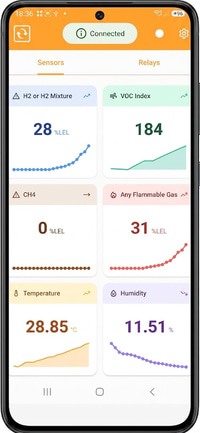
Real-time graphing & trending of all gas channels.
Record gas (bump) tests with digital reports.
Run diagnostics to check sensor health.
Firmware updates of your sensors in the field.
Requires the Prevent-iON USB to RJ45 adapter.
Commission & configure sensors in the field — no PC required.
Real-time graphing & trending of all gas channels.
Record gas (bump) tests with digital reports.
Run diagnostics to check sensor health.
Firmware updates of your sensors in the field.
Requires the Prevent-iON USB to RJ45 adapter.
The Prevent-iON Mobile App is available from the Google Play Store.
It connects to the sensor via the AX-USB-RJ45 communication adapter (required).
Requires an Android 8+ smartphone or tablet, with USB OTG support.
It connects to the sensor via the AX-USB-RJ45 communication adapter (required).
Requires an Android 8+ smartphone or tablet, with USB OTG support.

Commission & Configure
Set thresholds, slave IDs, Modbus RTU communication settings and relay triggers per gas type & LEL% — right from your phone.
Real-Time Graphing & Trending
Live readings, graphing and trending for every gas channel, with warm-up status display and automatic sensor detection.
Inspection: Gas (Bump) Testing
Record periodic gas (bump) tests and generate digital test reports for your annual inspection trail.
Diagnostics
Run diagnostic tests to check sensor health and detect issues on site — before they become field failures.
Firmware Updates in the Field
Update the firmware of connected Prevent-iON sensors on site, keeping deployed detectors current without a PC.
Works Offline
Fully functional in the field without an internet connection — inspection reports are sent to the cloud. Lightweight (<20MB) and fast.
AX-USB-RJ45 Adapter
The required communication adapter between your Android device and the sensor, connecting over a USB Type-C data cable.
Supported Sensors
Works with R-GAS-FLAMMABLE, DAISY-GAS-VOC and R-LEAK-LOC — with support expanding in future updates.
Technical Specifications
View supported devices, minimum Android version, connection interface and application details for the Prevent-iON Mobile App.